How to Use TextPixAI to Create Images and Articles
TextPixAI brings several AI tools together in one place: an AI Writer with 60+ templates, an AI Image Generator, Text to Speech, Speech to Text and AI Chat assistants. This tutorial shows how to use TextPixAI step by step to create images and articles, from signing up to editing and publishing, with tips for better results and honest notes on what to check before you share anything.
Getting started
- Create an account on textpixai.com and sign in.
- Check your plan. The pricing section shows what each plan includes, such as word and image allowances.
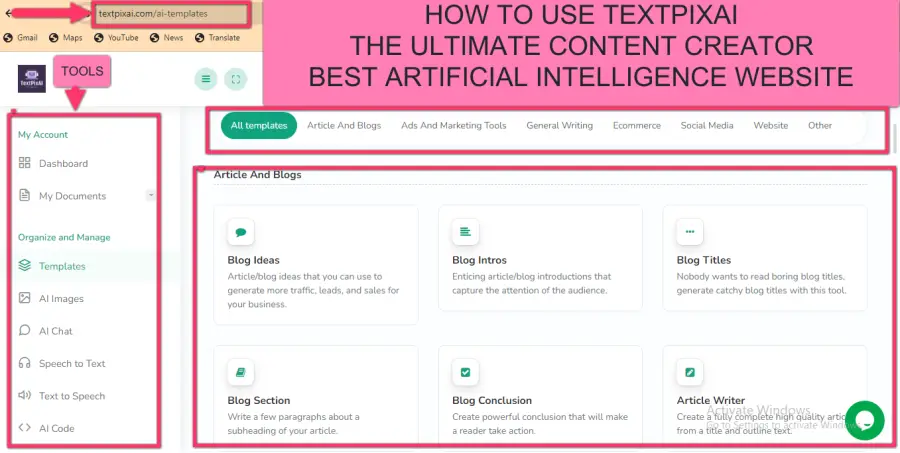
- Open the dashboard to see the tools: AI templates, AI images, AI chat, speech to text and text to speech.
How to generate images
Step 1: Open the AI Image Generator
From the dashboard, open the AI Image Generator.
Step 2: Write a clear description
Describe what you want to see: the subject, setting, style, lighting and mood. For example: "A flat illustration of a small bakery shopfront at sunrise, warm colours, simple shapes, for a blog header". The more specific the description, the closer the result will be.
Step 3: Choose options and generate
Select any available options, such as style or size, and generate. If the first result is not right, adjust one thing at a time in your description: change the style, add details or remove elements you do not want.
Step 4: Download and use responsibly
- Use AI images for illustrations, blog headers, social graphics and concept art.
- Label realistic AI images as AI-generated, and do not present them as real photos of real people, events or your actual products.
- Avoid prompts that copy a living artist's style, trademarks or real people's likenesses without permission.
Our guide on how to label AI-generated content explains why labelling matters, including new EU transparency rules.
How to write articles with the AI Writer
The AI Writer has templates for different jobs. For a blog article, a good sequence is:
- Blog Ideas: enter your topic and audience to get angles. See how to use an AI blog ideas generator for tips.
- Blog Titles: generate clear title options and pick one that matches what readers search for.
- Article Outlines: create a structure with headings.
- Blog Intros: draft an opening that states what the reader will learn.
- Blog Section or Article Writer: draft each section.
- Blog Conclusion: summarise and suggest a next step.
- Meta Tags (Blog): draft a title and description for search engines.
Helpful editing templates
- Content Rephrase and Article Rewriter: rework a paragraph that reads awkwardly. Do not use them to disguise copied content.
- Text Extender and Content Shorten: adjust length.
- Tone Changer: make text more formal or friendly.
- Passive to Active Voice: make sentences more direct.
- Translate: create a first-draft translation for a fluent speaker to check.
Other templates worth knowing
- Marketing: Facebook Ads, Google ad titles and descriptions, LinkedIn ads, Instagram captions and hashtags.
- E-commerce: product descriptions, Amazon product titles and features, product name generator.
- Business: emails, email subject lines, company bios, mission and vision statements.
- Video: YouTube titles, descriptions, outlines and scripts, TikTok video scripts.
- Creative: stories, song lyrics and a movie script writer.
Beyond images and articles
- AI Chat: ask questions, brainstorm or get feedback on a draft in the AI Chat assistant.
- Text to Speech: turn an article into audio. See how to turn a blog post into audio.
- Speech to Text: transcribe recordings and voice memos.
Before you publish: a quality checklist
- Check facts, names, numbers and dates.
- Add your own examples and experience.
- Read it aloud to catch awkward phrasing.
- Make sure headings are clear and the intro answers "what will I learn?".
- Add internal links to related posts and pages.
- Label AI images where appropriate.
Google's guidance on AI-generated content says it focuses on the quality of content rather than how it is produced, so this editing step is what makes the difference.
Tips for better results
- Be specific: name your audience, goal and tone in every request.
- Work in steps: ideas, then outline, then sections, rather than one giant request.
- Regenerate and combine: take the best parts of several drafts.
- Keep a prompt library: save prompts that work well for your business.
- Check rights: the US Copyright Office's AI resources explain how human authorship affects copyright in AI-assisted work.
Turning one article into more content
Once your article is ready, reuse it. Generate Instagram captions and LinkedIn posts that summarise its key points, create a featured image and two social graphics with the AI Image Generator, and produce an audio version with Text to Speech. Draft a short email to your list linking to the post. One afternoon of work can give you a week of content across channels, all pointing back to the original article.
Key takeaways
- Use the AI Image Generator with clear, specific descriptions.
- Build articles step by step with the AI Writer templates.
- Label realistic AI images when you share them.
- Edit and fact-check everything before publishing.
Related guides
Keep reading in this topic cluster:
- AI Content Creation: Complete Guide for 2026
- Transcribe Voice Memos to Text Free: Easy Ways
- How to Write Product Descriptions With AI
- How to Outline a Blog Post With AI (With Example)
- Can AI Replace Human Artists? An Honest 2026 Look
Frequently asked questions
Is TextPixAI free?
See the pricing section on the homepage for the current free and paid options and what each includes.
Do TextPixAI images have watermarks?
Check your plan details on the pricing section. Whatever the plan, label realistic AI images when you share them.
Can I use TextPixAI content commercially?
Review the Terms of Service for usage rights, and make sure your content does not infringe others' rights.
Which template should I start with?
For blogging, start with Blog Ideas and Article Outlines. For marketing, try product descriptions or Instagram captions.
Can I create images and articles in other languages?
Many templates let you choose an output language, and the Translate template can help. Have a fluent speaker review the result before publishing, especially for marketing or formal content.
Do I need design skills to use the AI Image Generator?
No. Clear descriptions are what matter most. Basic design sense helps when you choose and crop images, but you can learn that as you go by comparing results.